
by the author of
The Ultimate Guide to Frugal Living and The Flat Broke Cookbook
Even if you do NOT use delivery or pickup for your groceries, you can still use online carts for comparison shopping. Gas prices are utter madness right now, and nobody has the money to spend, driving from store to store to save a few bucks here and there.
I’ve written before about how using services like grocery delivery and curbside pickup can sometimes save you money. (When you can’t be distracted by impulse buys, it’s a whole lot easier to stick to your list.) Further, for me, the ability to order groceries online has been incredibly helpful because I don’t have to depend on anyone else’s schedule to get food to the house.
There’s a strategy I use to decide which of four local grocery stores I’m going to visit on a particular shopping trip. All it takes is registering with a service like Instacart.
How to get started
It’s easy peasy – you don’t have to put your credit card number in if you aren’t actually making a purchase, but they’ll need your phone number. They will not call or text you unless you are making a purchase through the service, and then, if there’s a substitution because your original choice is not available, they’ll message you for your OK. Simply go here and set up your account. (If you DO decide to use the service, you’ll save twenty bucks with that link.) For the record, I have never had any issues with credit card fraud using these services. The shoppers don’t have access to it – only the company does – and the purchases are made through the app on the shoppers’ end as well as yours.
Make your list
Then, make your shopping list. You have to be specific. You don’t want to just compare apples to apples. Compare Red Delicious to Red Delicious.
The items I’ve chosen aren’t grocery recommendations. They aren’t necessarily the least expensive options. I just wanted to cover a general grocery list as an example. Here’s my list for this exercise:
- 1 gallon of whole milk (store-brand)
- 1 lb of Land O Lakes butter
- 12-ounce box of store-brand Cheerios
- 1 loaf of Nature’s Own whole wheat bread
- 16-ounce jar of Jif Natural peanut butter
- 2 lb of ground turkey
- 1 rotisserie-cooked chicken
- 1 head of romaine lettuce
- 5 lb. bag of gold potatoes
- 3 lb. bag of yellow onions
- 3 lb. bag of Gala apples
- 2 lb of carrots
Now, fill your carts.
Then, choose the stores you want to compare. If you aren’t in the area of those stores, click “pick up” or change your zip code on your account so that you are in the area. Remember, you aren’t actually ordering.
I chose Publix, Food Lion, Harris Teeter, and Aldi.
Go to each cart and put in the items on your list. Make your choices as similar as possible. You’ll also have the benefit of learning whether or not your item is in stock at the time you build the cart.
Note that Aldi doesn’t always carry the same brands or even the same items as the other stores, and this threw off my numbers a little. Just get as close as you can.
TIP: When looking for the generic option, use the sidebar to choose a department, then find the dropdown box that says “brand”. Then opt for “store brand.”
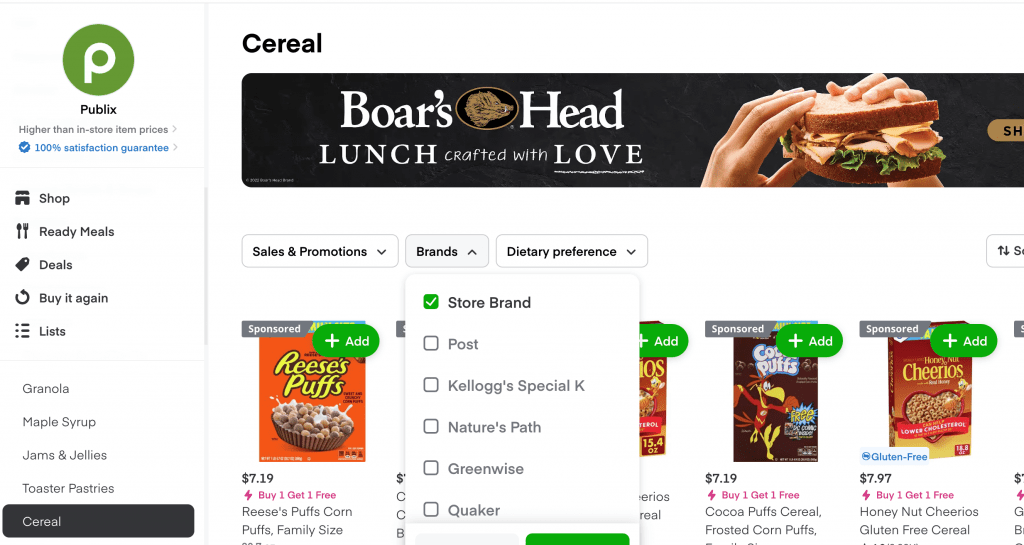
Here are my local results.
I was able to find all items (at least some version of them) at the stores where I “shopped.”
Here are my results for this week.

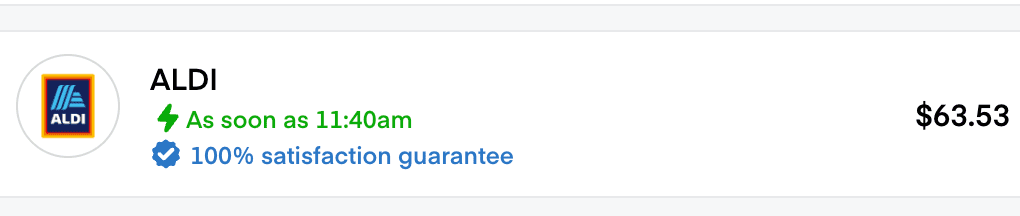


The same list was compiled at each store.
- Food Lion $62.42
- Aldi $63.53
- Harris Teeter $71.41
- Publix $79.38
This week’s winner was Food Lion. It was about a dollar cheaper than Aldi and had the exact items I was looking for, which Aldi did not. Harris Teeter was almost $10 more, and Publix was about $16 more. This was a very small list (and I’m dying that it cost 62 bucks, but that’s a story for a different article), so you’d probably find a bigger difference with a bigger list.
Ways to make the most out of online shopping carts
If you go on the left-hand sidebar, you can find stuff like “Sales” and “Deals” listed. I always click on these to “shop the fliers.” This way, I can be sure I’m getting the most bang for my shopping buck, and if one store is having an awesome sale, I can say “to heck with it” and just go there and get the loss leader to stock up my pantry. (I wrote a whole book on building a pantry – check it out here.)
I can calculate pretty accurately what my bill will be ahead of going. I can also see if a dollar or so is worth the extra gas to get to a more distant store.
I calculate that I save $30-40 every time I shop by comparing my lists online at different stores.
Things to remember
Here are a few things to keep in mind when comparison shopping online.
- Sometimes it’s worth it to pay more for a single item to get the rest of the cart way cheaper.
- Sometimes you may want to skip an item that is just more than you want to spend that week.
- You can change your list based on good sales if there’s something that is a staple in your home that is on for a great price.
- Figure out the cost of mileage if your stores aren’t close by. If you’re spending $3 extra in gas, it’s not really worth it to save $2 in groceries.
As always, be flexible, and you’ll do far better financially!
How do you do comparison shopping?
Do you use online carts for comparison shopping? Would you consider giving it a try? What are your thoughts on this method? Let’s talk about it in the comments section.









3 Responses
We live in a small town with only two small grocery stores. One is very expensive, the other more expensive than big name grocery stores. I use the app for the less expensive store and seldom purchase anything that isn’t a loss leader or on sale. If I’m going to a doctor’s appointment or have other necessary business in the town 35 miles away, I check the sales apps for the stores there and shop the sales. There are some things I purchase at Walmart in the bigger town because they are almost always less than even the loss leaders. I also always check the marked down meats, produce and bakery items. The stores in our small town are less than a mile apart, so there isn’t a great deal of difference in gas. If I have to drive to the larger town, the three major stores there are within a two mile radius. And I keep track of mileage if it is a medical trip — so am able to claim it on my taxes. I also try to always have back-ups so I don’t run out of something and have to purchase it at regular price at the local grocery. I make my meal plan and grocery list according to what is in my freezer and pantry, and advertised on sale that week. And last, we don’t waste anything. A few weeks ago, I purchased a whole chicken, marked down for quick sale at $6.98. We had two dinners and two lunches from the baked chicken, then I put it in the crock pot, along with some bones frozen from chicken thighs we had a few weeks ago. I cooked all of it, with added water, garlic and onion for seasoning, for about twelve hours. Ended up with several cups of broth to freeze and six bags of shredded chicken for future meals (chicken pot pie, enchiladas, etc.) that are in the freezer. Since I only cook for two, this prevents us having to eat the same thing over and over so it doesn’t go to waste. I also have hamburger (cooked and uncooked) in my freezer in meal size portions, that I can use to make small casseroles, salads, etc. — using hamburger that was marked down for quick sale, and frozen the same day of purchase. This also works with pork, purchased on sale, used for fresh meals a couple of times, then made into pulled pork and frozen in meal size portions. I would miss the quick sale items if I didn’t shop in person. Our stores have some delivery services for people who cannot get to the store, but there are extra charges.
There are no real stores here to make comparisons with. Walmart sits at the edge of our tiny rural town. About 25 miles away is another rural grocery store. Since it’s effectively Walmart or Walmart I aim to order what I need from Walmart.
I make my order online. Over $35 prepaid and they will shop my list, bag it, and deliver to my front gate. The driver will carry it to my door but I meet them with a wagon and take it in myself. I even order my chicken feed for about 6 weeks at a time. It saves me lifting 4, 40 lb bags into a shopping cart, loading them into my vehicle, then unloading them into the wagon. They are placed in the wagon and I pull them nearly a city block of rough dirt path and park the wagon at the open coop door. Lift and carry the bags 8 feet. If I need to open one I lift it up on the ledge in front of the nesting boxes and open it and tip it into the 55 gallon drum I made into a feeder. Believe me I’d pay them some extra to save lifting them all, the three times they do it for me. As for the groceries; once the driver loads the wagon it’s easy, we have a nice ramp up to the front door. I take the wagon into the house and right up to the cabinet where I want to unload. Refrigerator items then get pulled up to the refrigerator to set things inside. Then pull the wagon back to the front yard. No charge for delivery and no membership fee either. And I spend $0 gas for the shopping trip. I do try hard to think of everything I want.
If I can I buy things in bulk. 12, 1 lb generic boxes of salt or oatmeal in the larger rounds in sets of 3. Sugar I figure the price per ounce and get the cheapest. Surprisingly 4 lb bags are often the Best Buy.
I could pick up the grocery order at the store but delivered is by far better for me. No difference in price.
I get sales prices, can buy generic or brand name, and all groceries and animal feeds and the online only items as well are available to me. Bulk freeze dried items are available online in cans or bulk bags. I’ve been surprised at what is available. The national brand of freeze dried foods are often on sale in #10 cans cheaper than I can buy fresh. And I can use them now or 25 years from now.
I know it isn’t most folks first choice in shopping and I might choose someplace else if it were available. But at almost 80 years old, it’s both available and delivered! For me that’s a blessing.
Nifty illustration!